Atarim 5.1.5: build the care plan once, put every client on it
Every agency sells care plans. Very few can deliver the same care to every client, every month, without someone having to remember.
5.1.5 is for that. Build a care plan once in the new Plans tab, add your sites, and the work runs on its own cadence: backups every week, updates and a care report every month, an SEO sweep every quarter.
Two more things make that plan reach further:
- GitHub. Claro's team can now work on sites that live in a repository, like the Astro sites more and more of you are building.
- Three versions of every care report. What you show the client and what you need to know are no longer the same document.
That's what this release is for.
New features
Care plans in the Plans tab
Open Workflows and you'll find a new Plans tab. A plan is your care plan, laid out the way you'd sell it: Daily, Weekly, Monthly, Quarterly and Yearly.
- Build it. Drag workflows in from the library on the right, including the scheduled workflows you've already built, and move them between bands as the plan changes.
- Apply it. Under Sites on This Plan, add the sites you look after. A site sits on one plan at a time, so adding it to a new plan moves it off its old one, and nothing runs twice.
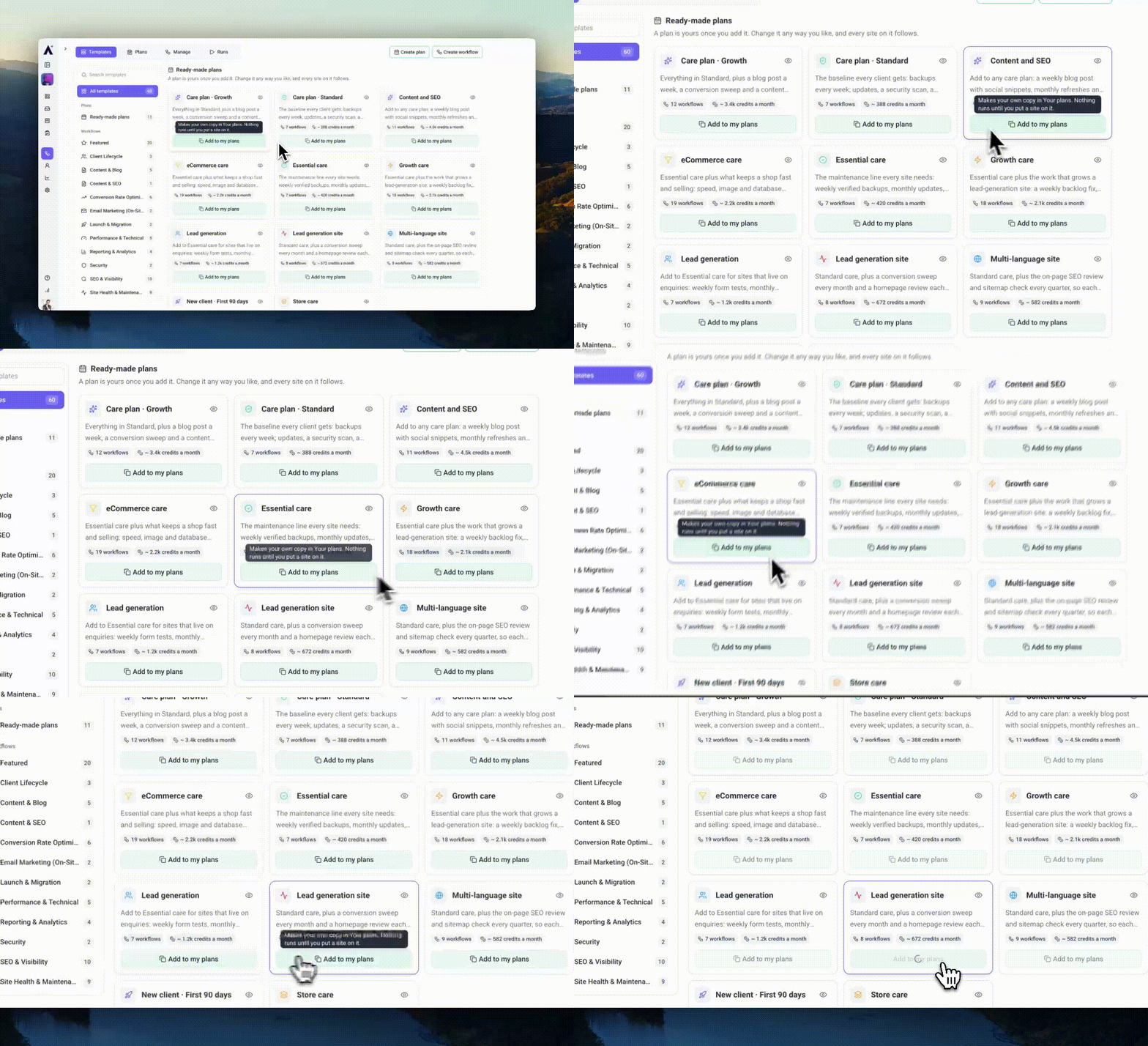
- Or start from ours. Templates now opens with Ready-made plans: Essential care, Growth care, eCommerce care, Lead generation, Content and SEO, and New client · First 90 days, with a check-in each month. Preview one, use it as it is, or make it yours.
GitHub: work on sites that live in a repository
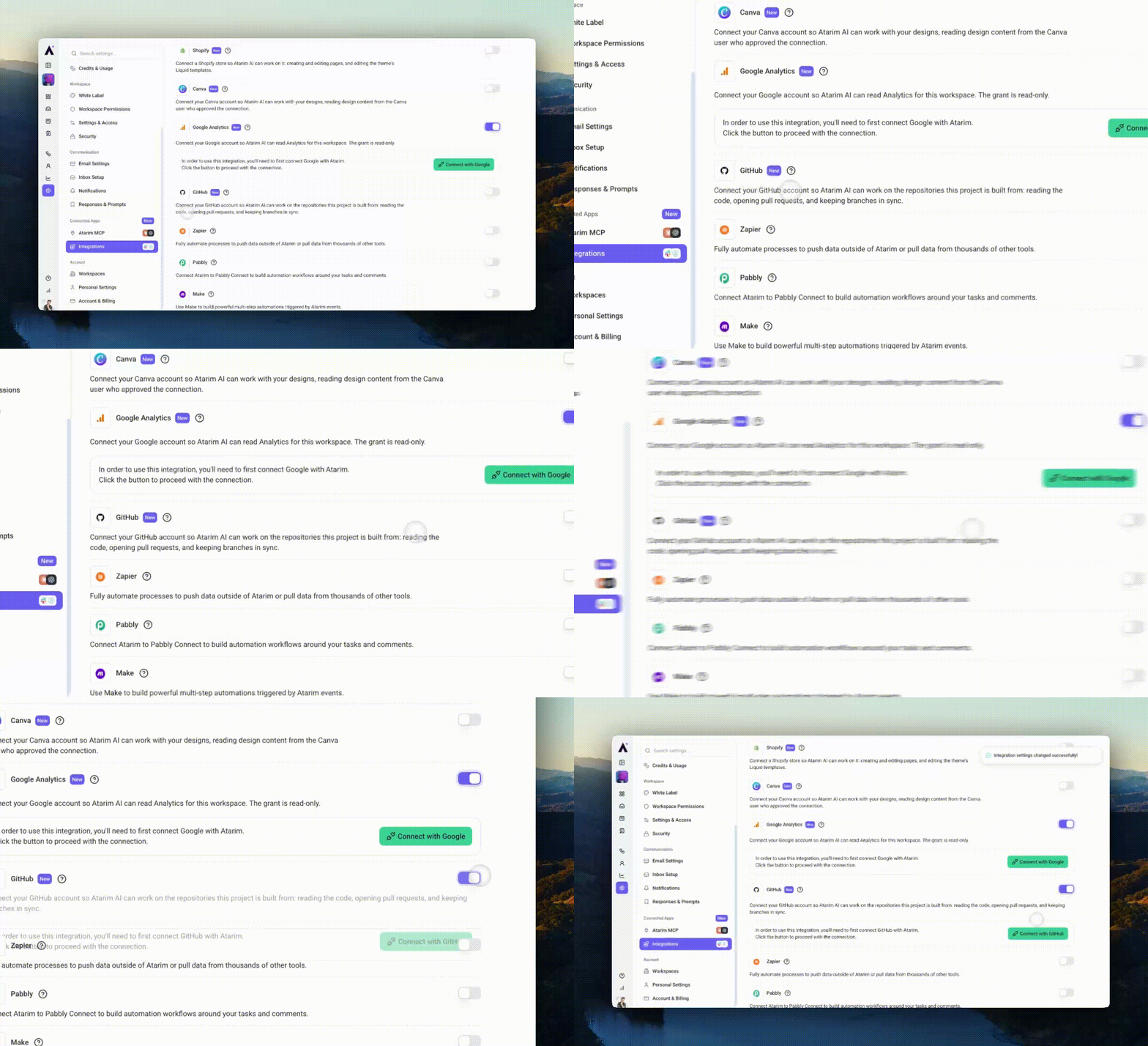
Connect GitHub in Settings > Integrations and link a repository to a project.
Claro’s team can then read the code behind the site, find what needs changing and work directly in the repository.
That opens up the sites that never had a WordPress admin to log into: Astro, and the other static and custom builds more agencies are shipping for clients.
We teased GitHub a few releases ago. It's here.
Try it
Drag the project into the chat, then paste:
"Go through this site's repository and list every page that's missing a meta description. Then write one for each."
The care report comes in three versions
Each care report is now written three ways, and you pick which one goes out:
- Agency version. The month as it really was, including what wasn't done. It stays with you as a private note on the task.
- Balanced version. The wins, plus up to three next steps.
- Client version. The completed work and the good results.
So the conversation with your client is the one you meant to have.
Templates and Manage, redesigned
- Templates splits into Ready-made plans and Workflows, with Save a copy on each.
- Manage is now a table, with a Sites and schedule window for each workflow and a Runs link straight to its history.
- A Claro rail on the Workflows page suggests next steps that know which plans you already have.
Smaller new things
- When credits run out, nobody hits a dead end. If your client is talking to the AI on their site, they see a card pointing them to you, by your agency's name, instead of an error, and if the project is set up so they pay, they can top up from the card. Your team sees who looks after credits and when they reset. You can buy a credits pack right from the card, or connect your own AI client instead.
- See more of the work in chat. While Claro checks a page or takes screenshots, a small browser window shows what he's looking at. When a task goes to a specialist, its card appears inside the reply: who's on it ("Pixel is working on this"), "Waiting for your approval" when the work is held, and a mark if a run failed. Workflow run cards show Paused in amber when a run stops for credits, and pick back up once credits are added.
- A default workspace. Signing in takes you back to the workspace you last had open instead of the picker.
- Context Files take every readable format, including .md and .docx. Search only reads the files you can see, and leaves out ones that have been replaced.
- Feedback tasks filter by status and sort either way.
- The Slack channel picker in workflows is searchable.
- Page names can be edited again.
- Test submissions for Contact Form 7 and WPForms that never email your client or fire their integrations.
- Draft preview links last as long as you need: seven days by default, anything from one to thirty.
AI updates
Small fixes go live, with the old version on the task
Before, a one-word change on a published page came back as a draft for you to approve. Now Claro's team works the way a senior on your team would.
- What counts as small: text, images, alt text, SEO fields, a cache purge.
- What happens: done, checked on the live page, and the previous wording written on the task so you can put it back.
We asked for a heading change on a live service page. About a minute later the live page read the new line, everything around it was untouched, and the task held the old heading word for word.
Try it
Drag a website into the chat, or click any part of a page, then paste:
"Give me a new H1 for the home page based on the brief, and update it directly."
Bigger work gets one yes, and only from you
- What waits for you: deletes, updates to WordPress core or your page builder, and restores.
- How: one approval, in the approval queue. Major changes are checked against a restore point before they're queued.
- In plain words: each approval says what it will change, such as "Move a page or post to the bin", and the reply after a plugin install names the same action as the queue.
Approvals are yours, never your client's. Claro doesn't mark work as waiting for the client, and doesn't tell a client a change was made. What your client sees is what you choose to send them.
Try it
Drag a website into the chat, then paste:
"Update WordPress core on this site."
A restore point is checked first, then one approval waits for you in the queue.
Workflows that aren't WordPress-only
As we expand through GitHub, Shopify (currently in testing, coming very soon) and Duda, with more on the way, we've removed the "WordPress" badge from every workflow that works on more than WordPress.
The care report, update round, security scan, opportunity finder, content plan, blog, uptime check, form test and 30-day check-in check the site's platform first, and say plainly what that platform doesn't support.
Smaller AI changes
- The update round proves its work. A fresh backup, the updates, then the versions read back from the site and the pages checked visually.
- Fewer bounced drafts. The copy check no longer fails a heading for a missing full stop, passes reworded labels and plain-text copy, and runs at most twice per task.
- Brand claims come from your project brief, and pages and reports are checked on the live page.
- Bigger images are handled. Screenshots taller than 8,000 pixels are split, and images over the size limit are shrunk instead of failing the turn.
- The workflow canvas chat knows which workflow you have open, and a WordPress-only job only offers WordPress sites.
- Artifact links from Claro open inside the app.
Improvements
- Phones and tablets. Controls that used to appear on hover are always visible on touch, the Work stage stays in the app on phones and tablets, and the Inbox Content tab gets a phone toolbar with an Actions menu.
- Screenshots arrive by themselves. A task's screenshot appears on the board and in the inbox once it's ready, without a refresh.
- Activity rows show the new status and priority in colour.
Bug fixes
Workflows
- Runs are no longer failed while an AI step is still working.
- A step that runs out of credits pauses the run (shown as Paused) instead of posting the refusal as its output.
- Runs waiting on a delay keep their place when a template changes.
- The failure email names the step and the site that failed.
- A plan never shows a client the name of a workflow you've hidden from them.
- Back from a run trace keeps your filters; the Actions column in Manage no longer clips Edit and Delete; Arabic and Hebrew step counts are translated.
Workspace chat and Claro
- A specialist's finished work is no longer lost, reported as failed while still working, or posted after the task's status has already changed.
- A task stopped at the one-hour limit, or by credits, now says so to Claro.
- A failed message keeps its error and Retry; the reasoning box keeps following a live reply.
- Clicking a task card's subtasks no longer folds it shut; memories update after you switch threads.
- Writes to page-builder pages that would never have shown are refused with a reason, and approved WordPress changes that ran show as done.
Sign-up and onboarding
- Signing up with an email that already had a guest account creates a full account with a workspace.
- An account without a workspace is no longer stuck on the sign-up form.
- Onboarding no longer crashes when the browser translates the page, scans your site once instead of twice, keeps your brand through a reload, and lists the workflows it set up for you.
- The onboarding plan runs at the plan's own cadence and suggests credits from your own allowance.
- Signing in from a link takes you back to that page; /login?email= fills in your email; two-factor sign-in keeps the upgrade link.
The feedback experience
- Changing a task's status from the task pane no longer crashes the overlay.
- A refused change rolls back with a clear message instead of a raw browser error.
- The task popover sits behind dialogs instead of on top of them; the page is released if the feedback layer never loads; pages with ?embedded=true keep working.
- "Switch to a copy" opens the right page, and its notice can be brought back on phones.
- Stickers stay put under pop-ups that lock scrolling; tasks on elements that haven't loaded yet are no longer marked detached.
- Free-plan collaborators can attach files and annotate designs; public forms no longer skip ahead on a hidden timer; notification preferences survive a reload; AI review totals are correct.
Inbox, Boards and the editor
- Inbox search filters the list; filter chips wrap on smaller screens; the task that opens first starts at its newest comment; the DNS Copy buttons in Inbox setup are always visible.
- The link warning reads the real link address, ignores hidden characters, and works in comments too.
- Boards update live for URL projects, new columns no longer collide, the minimap clears Create a Task, the Backlog badge counts correctly, and a load failure shows one message.
- Linking a word keeps the space after it; images in an email signature stay in the editor; recordings over an hour show hours; the screen-capture prompt names the right buttons.
Projects, accounts and layout
- Clients added from any workspace appear on Projects, and Add Client only shows where clients can be listed.
- The client invitation email names the site.
- Add New keeps a client's details and pick when you retry; Delete project needs the right number typed; Delete account counts your projects.
- Opening a WordPress project no longer bounces you back to the grid; errors show the real reason; an unknown task shows a proper not-found page.
- The mobile menu no longer crashes with Resources open; the billing page and Add credits drawer fit phones; Upgrade To Unlock works from the workspace picker.
- Dark theme: the workspace subtitle, 2FA count, white-label previews and sign-in error mark are readable; white-label text reads on pale brand colours; the Share dialog's role is translated in every language.
If you run our plugin
Update to 5.1.9:
- Specialists can see what third-party plugins on the site can do, grouped by plugin.
- Media images are scanned in more depth.
- Theme file edits always wait for your approval.
- The site address and home URL can't be changed by a settings update.
- Changes Claro's team makes are tagged "Atarim AI" in WP Activity Log.
Coming next
Built and live for our team, opening once they've run against real customer sites:
- Guardrails. Choose how much Claro does without asking, per workspace, from Careful to Hands-off.
- Forms, built by Claro. Ask in chat and Claro creates a form or edits the one you have open, with Undo on every change and missing translations filled in.
- Your report style. Pick the design every report uses, in your brand colours and fonts.
Go and build your plan
Open Workflows > Plans and start from a ready-made one. Put three clients on it and tell me what's missing. 🤘
Vito